Virtual Memory & Paging
Address Translation, Page Faults, and Page Replacement Algorithms
OCT 6 · 2026 · 16 MIN READ
In all computers, programs execute instructions from the central processing unit (CPU), and executing those instructions requires parsing and modifying a memory address. This very reading and writing to the memory address, therefore, begs us to question:
“Where does that address actually lead?”
In contemporary computing, the obvious abstraction is that user-level interaction — where many of the applications we use are designated as programs — obfuscates the underlying physicalities of the working computer system. However, this abstraction is also essential for any operating system (OS) to run multiple processes: hundreds of active processes could share a limited system memory supply seamlessly. Without this abstraction, our software programs would crash into one another within their respective memory spaces, undermining performance and creating critical vulnerabilities.
Therefore, to achieve this abstraction, an operating system provides distinct representations of memory structure. For example:
-
Virtual (Logical) memory is an abstraction provided by an OS and hardware system that gives a process within a computer a sort of “illusion” of possessing its own memory address space, letting it be completely independent of other applications. In the background of this, the physical main memory — somewhere in, like, random access memory (RAM) — is shared among the other multiple processes that could be running.
-
Then, the CPU creates a virtual (logical) memory address; the “illusion” a process can “see.”
- Finally, through dynamic translation of the process’s virtual memory address, it produces a physical memory address, its final representation, which identifies the actual location in physical RAM.
-
The procedure above solves the systemic flaws of directly exposing physical memory addresses to user applications. In creating the “illusion” that alters a process’s fundamental perspective on memory, it allows the abstraction an OS needs to keep the user-kernel hierarchy intact, enables non-contiguous memory allocation (a process doesn't have its components and pieces clumped into a single unbroken block but rather can be scattered across RAM itself), and allows hardware-enforced policies and process isolation, when needed.
In a silly way, you could think that giving a process direct exposure to the physical memory space, rather than the “illusion,” would be infohazourdous to our small process guy, in that our small guy could irresponsibly overwrite critical kernel data and, due to the temporal nature of his creation, expansion, and termination, could create fragmentation in the physical RAM.
The procedure above has more depth than meets the eye; suggesting the need for abstraction and separation is intuitive. If we truly want to let a process’s virtual view of its own world apply to the material reality of the hardware, how do we make sure this quasi-sim2real gap is not badly discrepant?
Dividing Memory to Solve Fragmentation
Early memory management systems allocated continuous, or contiguous, physical memory in individual partitions, achieved via fixed-size partitions, unequal-sized partitions, or dynamic variable-sized allocation. It all came with its own engineering trade-offs; variable-sizing was good at avoiding memory waste inside partitions (internal fragmentation), but — as mentioned in the previous section, bad things happening to RAM — it was prone to external fragmentation, in that the physical memory in this case would be chopped into scattered tiny holes all over the memory space. These small holes literally could not satisfy new process requests, even when total free memory was abundant.
This external fragmentation was genuinely a real problem, so much so that system designers investigated two unique approaches to this:
-
In the compaction approach, occupied memory partitions are physically copied and joined together. Those small holes within free memory space — the by-product of external fragmentation — would then be combined into a single contiguous block of memory. However, repeatedly copying entire process memory spaces across RAM is extremely computationally costly; immense CPU time and poor scaling could not support the multitasking demands of contemporary computing.
-
With the abandonment of contiguous partition requirements, the core non-contiguous allocation approach is paging: both physical main memory and virtual address spaces would be divided into fixed, equal-sized blocks.
Within the paging paradigm, memory terminology is strictly defined as follows:
-
Pages:
- These are fixed-size chunks into which a process’s virtual (logical) address space is divided (ex., numbered , , , …).
-
Frames (Page Frames):
- These are also fixed-size — like pages — but represent slots in physical main memory equal in size to virtual pages (ex., or , always in powers of two).
-
Page Table:
- A data structure that is instantiated per process, managed by the OS and the memory management unit (MMU). A page table maps each virtual page of a process to its corresponding physical frame within the physical memory.
With memory structured in this discrete page-frame way, we still need to know exactly where — at the bit level within a computer system — the memory’s location is. This is where we start to understand that the encoding and subsequent address translation, which represent memory location, play a role.
Reading a Memory Address
Computer systems rely, fundamentally, on a different base system of counting numbers when they read, write, store, and make decisions on information: the binary representations of numbers (s and s, base-2). So when it comes to the address translation mechanism — our subsequent method of reading the memory addresses instantiated by the process — it requires structured representations. This means that when the OS and hardware systems declare the sizes and amount of virtual memory space allowed, they are all in strict powers of two, representative, of course, of base-2 binary. As an example to walk through:
Notation: I use and for numerical sizes in bytes and binary kilobytes, and for a bit count. Here, follows the course convention (see references); the standardized name for this unit is the kibibyte (KiB). Storage bits count data capacity; address bits count the bits needed to select a location.
-
We will let a bit represent the smallest unit of digital information, which can have one of two values: and .
-
If we let be the number of bits, and each bit possesses only two possible states, we can represent this relationship combinatorially as :
-
Therefore, bits can represent distinct values or states.
-
This can be visualized in an example: Given an -bit binary value, we can determine it has bit patterns, starting from:
through
- Assuming that we interpret this as an unsigned integer, and correspond to the base-10 numbers through . Thus, including , there are still possible values, aligning with our formulation.
-
-
-
Then, we will let a byte represent a grouping of bits. This means that, given a byte, the number of possible bit patterns can be denoted as:
-
As an example:
-
So if we let be the number of bytes, and let be the number of bits, we could notate the generalized form as:
-
-
Now that we know the bits-to-bytes relationship, we can scale the size in relation to bytes. If we go to the scale of kilobytes, the conversion is represented as:
-
So let's say we have kilobytes; we can formulate the conversion as:
-
And since every byte can also be represented as bits, the kilobytes-to-bits conversion can be represented as:
-
Therefore, if we let , , and represent kilobytes, bytes, and bits, respectively, then we can construct generalized forms:
-
Kilobyte-to-byte and kilobyte-to-bits:
Since :
Therefore:
-
Byte-to-kilobyte and Bit-to-kilobyte:
Since :
Therefore:
-
-
-
In memory addressing contexts, address bits can identify memory locations. If we were given address bits, then the number of address locations in memory can be found as follows:
-
With the same number of address bits given above, if you can represent the memory in a byte-addressable way, then each address selects one byte:
Thus, we can find the number of offset bits given the page/frame size (mentioned in the previous section) by looking at the exponent representing byte memory location. In our example, therefore:
For a generalizable formulation of this conversion, let be the page/frame size in bytes and be the number of offset bits. As such, the relationship here can be shown as:
and:
Therefore:
To scale to kilobytes, we will let be the page/frame size in kilobytes. To represent the exponent of the page/frame size with respect to kilobytes, we’ll let be derived as follows:
For these power-of-two page sizes, is an integer. So, to obtain the page/frame size in kilobytes:
Then, when we want to convert down to page/frame size in bytes:
Substituting for yields:
Add the exponents, and we get the kilobyte-to-byte page/frame size conversion representation as:
Recall that our offset bits were represented as when we were dealing with page/frame sizes in bytes. If, by looking at the exponent value, we can get our offset bits value, this means that for kilobyte page/frame sizes, our offset bits representation can be replaced to match what is contained in the exponent in , such that:
Therefore:
-
What is this all useful for, you may ask? Address splitting — the MMU dividing (making slices in its bits) an address string directly into a page number and a relative memory location — eliminates computationally expensive arithmetic division or modulus calculations. So, if we really want to be able to read, interpret, and split these memory addresses without being thrown a ton of s and s, an incredibly compact way in which many visualizations and pedagogical resources (and thereby many of the systems designed in computers, as a by-product) depict these addresses is in a base-16, hexadecimal representation of a counting system.
A quick crash course on hexadecimal, so I don’t use jargon notationally:
-
Memory addresses operate in binary representations based on physical hardware fundamentals and can be represented more compactly; the hexadecimal system is a base-16 counting system, such that:
Where
-
Given this, we can determine that the hexadecimal counting system has possible values per digit. This means that:
-
As an example, with the subscript number representing the base of the number’s counting system:
-
-
Therefore, if we let represent the number of hexadecimal digits and represent the number of bits, we can denote this as:
And, conversely, for a bit width divisible by , as:
-
In the context of paging, let be the number of offset bits and be the number of hexadecimal digits the offset occupies. When is divisible by , we can denote:
-
So, for example, if we take a page/frame size:
-
Then, let's say we have a virtual memory address, written in hexadecimal, as:
If we have a page/frame size, we can split this address in accordance with the number of offset bits — and by extension, offset hexadecimal digits — that comes with ( offset bits, or offset hexadecimal digits). Therefore:
Where:
And:
-
You can visualize this here (GPT-generated diagram, sourced from what I drew on paper, sorry):
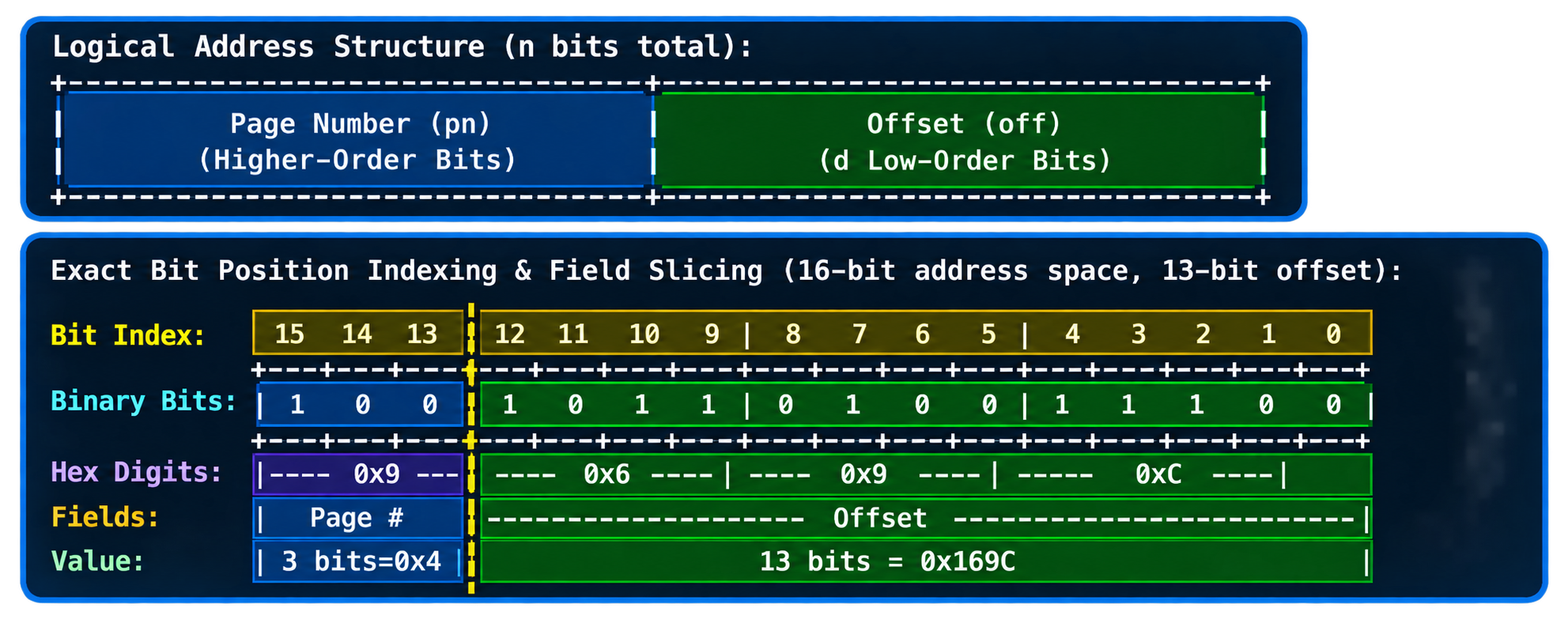
Keep in mind that — intentionally — the bit boundary between the page number and offset is not aligned neatly with hexadecimal digit boundaries in this diagram. Here, we have a -bit memory address with page size (the offset is bits); the offset cross-cuts the second hexadecimal digit (or in binary). This then leaves the top subsequent bits (or in hexadecimal) as the virtual page number.
Now that we have parsed and split the virtual memory address into its designated page number and offset, how is this address translated into the physical address in RAM it needs to target?
Following a Memory Address into Physical Memory
Given the page-organization schemes mentioned above, a CPU requesting access to a virtual memory address — with a corresponding page in main physical memory — can execute the virtual-address-to-physical-memory translation seamlessly. This is because virtual pages and physical page frames are the same size, and the offset also possesses the same property. Therefore, translating a virtual address into a physical frame number requires only the high-order page number for the hardware to execute.
But storing page tables in physical memory creates a bottleneck: it creates a delay between a data (instructions, a program’s payload) request and its subsequent arrival; two physical memory lookups — one to read and retrieve a translation address from the page table and another to access and write the actual data in the target memory address — are going to create a doubled memory latency (a slowdown penalty, specifically). To solve this, modern computing systems incorporate a high-speed hardware cache called the translation lookaside buffer (TLB). TLBs have been quite successful; they cache frequently used page-to-frame mappings directly inside the MMU. Thus, in sub-nanosecond hardware cycles, address translations are resolved on a TLB hit, while a TLB miss requires falling back to the page tables stored in physical memory.
This process of address translation is executed by the hardware system in the following sequence:
-
Receive the address by reading the virtual hexadecimal or binary virtual memory address issued by the CPU
-
Based on a contiguous binary bit string from 1, calculate the offset width from a page size of bytes (ex. where )
-
Split the bit string into a high-order page number and low-order offset.
-
Perform a lookup on the page table by indexing the TLB using the page number to retrieve a physical frame number.
-
Reconstruct the address by combining the retrieved frame number with the unchanged offset, and padding the frame number with leading zeros (if the physical frame field width is given and requires it)
-
Convert the reconstructed binary string, ready for hardware bus access.
We can, therefore, formulate the notion of physical address translation in a way like this:
Requested pages in this mechanism are assumed to be already occupying RAM. So, if a program requests data not already in RAM, we need another paging mechanism, one that transforms notions of virtual memory as a whole. Previous understandings of paging upheld that an entire program must reside in physical RAM before execution. However, a program also does not use all its data, all of the time. This means we need a mechanism akin to a simple, economical data-for-program supply-and-demand system.
True… Virtual Memory?
It is in the last section: yes, this is where we need demand paging. Demand paging loads virtual pages into physical memory on demand, allowing a program’s virtual address space to far exceed the host physical RAM capacity. An example of this would be a process executing on a physical memory system. Incredibly neat, this seems like true virtual memory now!
In order for this to maintain itself and essentially manage the “residency,” each page table entry (PTE) contains markers of status or control, represented by a bit:
-
Present/Absent bit:
- Set the bit to if the page is currently a “resident” in physical RAM (present); otherwise set to if absent from physical RAM (absent)
-
Protection bits:
- Records access permissions (such as read-only, read-write, executable)
-
Modified (dirty) bit:
- Tracks whether the page has been written to since it was loaded.
-
Reference bit:
- Tracks whether the page has been accessed recently
-
Caching-disabled bit:
- Controls caching behavior for the hardware
Before proceeding, understand that a page absent from physical RAM can still belong to a valid virtual address space mapping; the OS must check the mapping and access permissions before bringing it into RAM. So, what actually happens when our process requests one of these absent pages?
The hardware raises a page fault, an OS-oriented control mechanism that takes a valid request requiring a page from backing storage — a Solid-State Drive (SSD) or hard drive — and processes it through the following sequence:
- Validate the access as described above.
- Locate the required page in its backing storage, and obtain a physical frame in which to place it.
- Load the page into that frame. If obtaining the frame requires an eviction, handle the outgoing page first.
- Update the page table with the new frame number and residency status, and update or invalidate affected TLB entries as needed.
- Restart the instruction so that its memory access can now proceed.
Step 2 still leaves a decision unresolved, however: where does the incoming page go if no suitable frame is free?
Resident Evicting
"Which resident page should be evicted?" the OS asks. We touched on memory address translation and fault handling: hardware translates addresses and raises page faults, while the OS handles those faults. However, when obtaining a frame requires evicting a resident page, the OS’s replacement policy selects who is to be evicted (we'll use the term victim, here) in order to fulfill step 2 from previous section. This OS policy is called a page replacement.
The Modified (dirty) bit introduced earlier now determines whether eviction requires a write-back. All content that is modified must be preserved in backing storage before the victim’s frame is overwritten. In accordance, a clean page with an up-to-date backing copy needs no write-back. Fault handling then continues with the loading and mapping updates described above.
However, evicting a page the program immediately requests causes another fault, again. If repeated paging dominates useful execution, the system is thrashing.
In the following visualizations, to make these decisions visible, we will use the same setup for all three replacement algorithms:
- Page hit (H): The requested page is already resident in one of the available frames.
- Page fault (F): The absent-page case described above. Loading into an empty frame also counts as a fault.
- Physical Memory: Three initially empty frames, numbered , , and .
- Reference String: An example sequence of requested page numbers:
7, 0, 1, 2, 0, 3, 0, 4, 2, 3.
First-In, First-Out (FIFO)
A resident page that arrived first is the first to leave. Whoever comes first, they also go out first, too. We can represent this using an arrival queue, adding a newly loaded page at the back and removing the oldest page from the front. A hit does not change this ordering, even if that access suggests the page is still useful.
Second Chance
An extension of FIFO, the reference bit — introduced earlier and denoted here by — marks to qualify the former algorithm's choice. Newly loaded pages enter with , and a later hit sets . This initialization convention is part of the example; other descriptions may account for the access that loads a page differently.
When a replacement is required, inspect the page at the front of the queue:
- If , evict that page.
- If , clear the bit to , move its identifier to the back of the queue, and inspect the next candidate.
A circular implementation, commonly called Clock, advances a pointer around the candidates instead of repeatedly moving queue entries.
Least Recently Used (LRU)
Rather than recording arrival order or a single reference bit, the order of accesses is recorded, creating Least Recently Used. The page whose most recent access lies furthest in the past becomes the victim. This reinforces a practical expectation of program behavior fundamentally, rather than a guarantee about the next request innately.
Because this approach relies on temporal locality, recently accessed memory is often accessed again soon, letting LRU update its bookkeeping on every access, including hits.
Conclusion
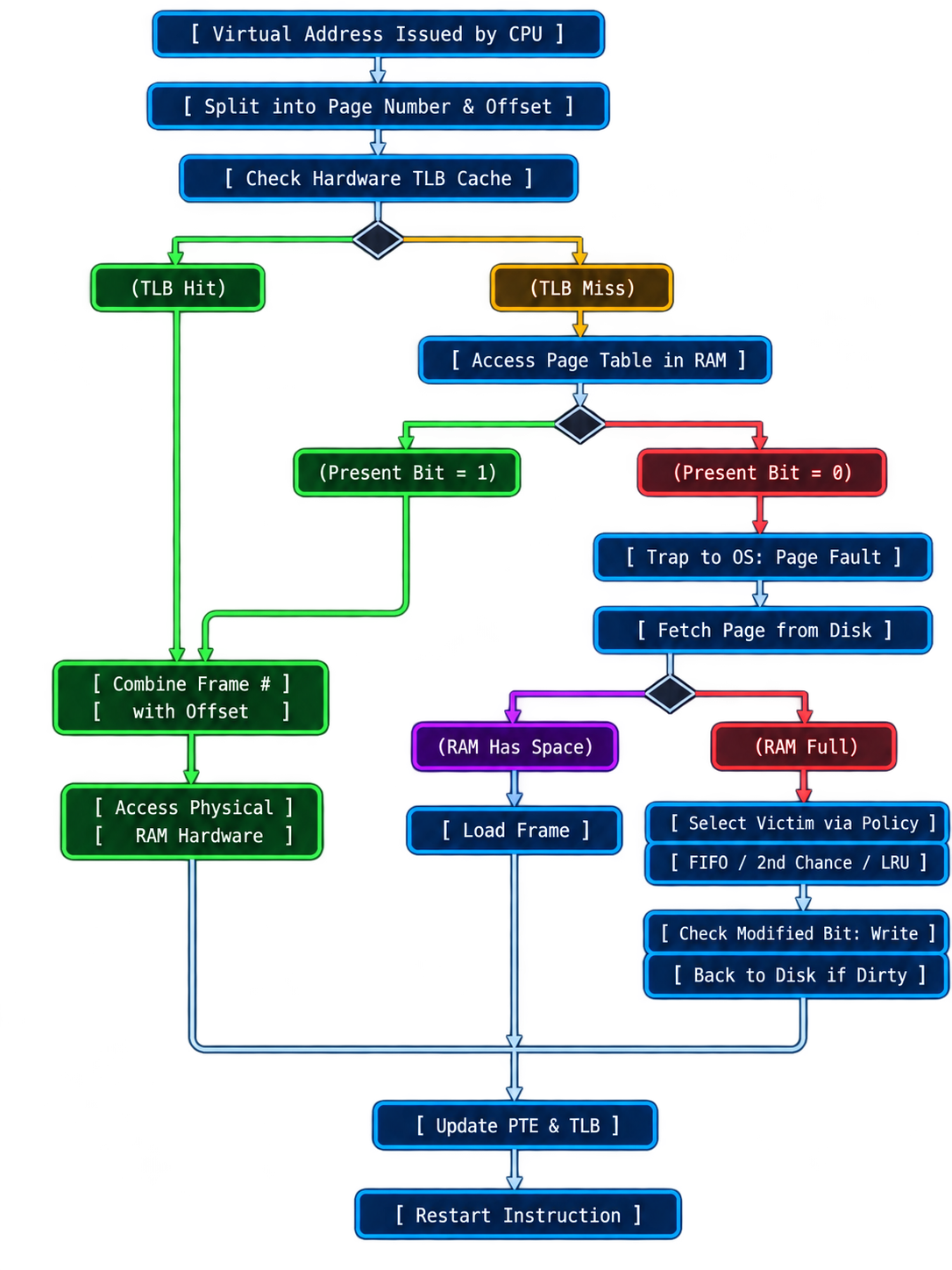
Here is a diagram that sums this all up (GPT-generated diagram, sourced from what I drew on paper, sorry, again):
References
Course Materials
The following resources are from ITSC-3146: Intro Operating Systems & Networking, UNC Charlotte General Curriculum. The worked examples and animations in this article draw on these materials and my annotated slideshow.
- Memory Management — Part 4. Lecture slides and accompanying transcription.
- Memory Management — Part 5a. Lecture slides and accompanying transcription.
- Memory Management — Part 5b.
- ITSC-3146 Module 8-1 — Memory Management. Supplemental slides.
- Memory Management — Part 6. Lecture slides and accompanying transcription.
- Memory Management — Part 7. Lecture slides and accompanying transcription.
- Virtual-Memory.pdf. Supplemental slide deck supplied with Module 8-2.
Further Reading
- Remzi H. Arpaci-Dusseau and Andrea C. Arpaci-Dusseau. Operating Systems: Three Easy Pieces, Chapter 13: The Abstraction—Address Spaces. Background on a process’s view of memory and the goals of virtualization.
- Remzi H. Arpaci-Dusseau and Andrea C. Arpaci-Dusseau. Operating Systems: Three Easy Pieces, Chapter 18: Paging—Introduction. Pages, frames, page tables, and address translation.
- Remzi H. Arpaci-Dusseau and Andrea C. Arpaci-Dusseau. Operating Systems: Three Easy Pieces, Chapter 22: Beyond Physical Memory—Policies. FIFO, LRU, reference bits, Clock, and replacement-policy comparisons.
- John T. Bell. Operating Systems: Virtual Memory. University of Illinois Chicago course notes, based on Operating System Concepts, Ninth Edition, by Abraham Silberschatz, Greg Gagne, and Peter Baer Galvin. Demand paging, fault handling, and replacement diagrams.